

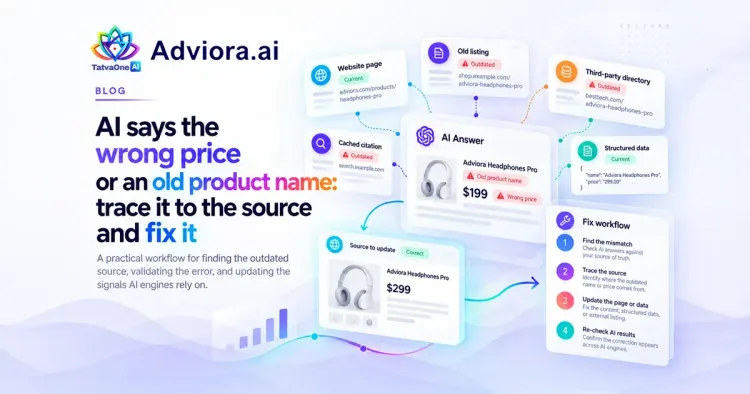
Why does ChatGPT say wrong things about my business?
AI engines answer from two places: what a model picked up in training, and pages it fetches through search. Either can be out of date. When sources disagree, an engine may pick one or blend several, and it will state the result with complete confidence.
For a brand like Dewbloom, the stale facts usually sit somewhere fairly ordinary. A comparison article or gift guide written last year still lists the ₹399 price. A marketplace listing was copied from the launch press kit and never touched again. Somewhere on Dewbloom's own site, an archived price list or a PDF catalogue is still indexed. And if the product got a new name on the website but kept the old one in a few directories, an engine can easily treat SPF 30 and SPF 50 as two products that both still exist.
How do I check what ChatGPT says about my brand?
Ask it what your shoppers would ask, and keep a record. Note the exact question, which engine you used, the country and language, the date, and the full answer with any sources it lists. For Dewbloom that means questions like "how much is Dewbloom sunscreen?" and "is Dewbloom SPF 30 good for oily skin?"
Add a couple that don't mention the brand at all, such as "best sunscreen under ₹500". A wrong price can turn up in a list of recommendations too.
Run each prompt a few times before drawing conclusions. A wrong price that turns up once could be noise. One that keeps coming back has a source somewhere, and your notes become the before picture you'll compare against later.
How do I find the source of a wrong AI answer?
Open the sources the answer cites and look for the wrong detail on each page. Some engines don't list sources, or only show a domain name. In that case, search Google for the wrong fact in quotation marks, something like "Dewbloom" "₹399", and write down every page that still has it.
Then split what you find into pages you control and pages you don't, since you'll handle the two quite differently.
What should I fix on my own website first?
Start here, since editors and engines will check your site before they believe anything else. Put the current facts in plain words on your product pages, shop or pricing pages, About page and any comparison pages. Check that your structured data matches what's on the page; the price in your Product markup should be the price a shopper actually sees. If you sell through Google Shopping, update your Merchant Center feed at the same time, because Google reads product facts from there too.
Next, deal with the old versions. Update or take down archived price lists, PDFs and press releases that still carry the old facts, and redirect retired product pages to the product that replaced them. For Dewbloom, the SPF 30 page should send people to the SPF 50 page.
If Google keeps showing an old snippet for one of your pages after you've changed it, Search Console's Removals tool can clear that snippet until Google crawls the page again (Google Search Console Help).
How do I fix outdated information on other websites?
Go through your list in order, starting with the pages the AI answers actually cited. Update every profile you control: marketplace listings, review platforms, directories and social profiles. On marketplaces you can usually change titles and descriptions from the seller dashboard, though some fields are locked to a shared catalogue entry and need a request to seller support.
For articles you don't control, a short, friendly email to the editor works more often than you'd expect, as long as it's easy for them to check. Dewbloom's might read:
"Hi Priya, your article 'Best sunscreens under ₹500' lists Dewbloom Daily SPF 30 at ₹399. We replaced it with Daily SPF 50 at ₹449 in August, and the current details are on our product page here. Could you update it next time you review the article? Thanks, Arjun, Marketing, Dewbloom."
Once a site has updated its page, you can ask Google to refresh its result with the Refresh Outdated Content tool, even though you don't own that site (Google Search Console Help). AI Overviews are built from Google Search, so that's one less stale page for them to pull from.
Where does ChatGPT get information about your brand?
Mostly from five kinds of page, and the old version of a fact can survive on any of them.
| Source | What to check |
| Your own site | Old price lists, PDF catalogues, press releases and retired product pages that are still indexed |
| Marketplaces | Product titles, prices, pack sizes and descriptions on every marketplace you sell through |
| Review platforms | Your profile's product names, prices and description |
| Comparison articles and gift guides | Price tables and product lists, often copied from one another |
| Directories and social profiles | Company description, product names, links and contact details |
How long does it take for ChatGPT to correct wrong information?
It depends on where the answer comes from. If the engine is searching the web when it answers, things can change within a few weeks of the pages being fixed and crawled again. If the wrong fact comes from what the model learned in training, it can hang around for months.
Run your original questions again after three or four weeks, on the same engines, and compare the answers with your notes. Count how often the old fact still appears across several runs.
Can I contact OpenAI or Google to correct information about my company?
You can report it, and for anything clearly wrong you should: ChatGPT and Google's AI Overviews both have a feedback option on answers. Don't expect a report to fix things on its own, though. The answer changes reliably only once the pages behind it say the right thing.
What's outside your control?
There's no way to make an engine update by a deadline, and you don't get a say in which sources it trusts. Answers will also keep shifting a little from run to run. The part you can influence is how easy the correct facts are to find, so keep fixing sources and keep re-checking until the old price stops turning up.