

Where AI referral traffic lands in GA4 today
On 13 May 2026 Google added an AI Assistant channel to GA4's default channel group. When GA4 recognises the referrer of a visit as an AI assistant, it sets the medium to ai-assistant, the campaign to (ai-assistant), and files the session under AI Assistant. Google's channel definitions list ChatGPT, Gemini, DeepSeek, Microsoft Copilot and Grok, and the release notes also name Claude (Google's default channel group definitions). Google's own AI Overviews and AI Mode are not part of it: clicks from those are reported under Organic Search.
In Adviora's property, the AI Assistant channel showed this for 17 September to 14 October 2026:
| Metric (17 Sep–14 Oct 2026) | Adviora |
| AI Assistant sessions | 213 |
| Engaged sessions | 205 |
| Engagement rate | 66.7% |
| Average engagement time | 2 min 17 s |
| Key events | 5576 |
| Source / medium | chatgpt.com / ai-assistant |
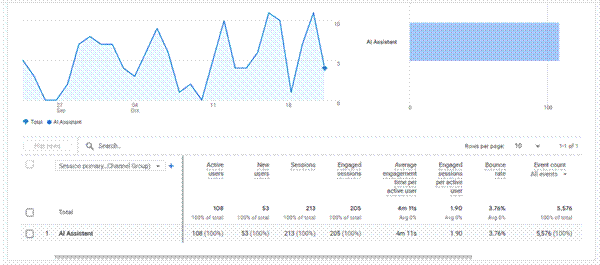
All 200+ sessions came from chatgpt.com, recorded as chatgpt.com / ai-assistant. They do show that the built-in channel was already picking up ChatGPT visits without any custom setup, which is why it is the first place to look.
Step 1. Read the built-in AI Assistant channel
- You don't need to create a custom report to get started.
- Open your Google Analytics 4 property.
- Select Reports → Acquisition → Traffic acquisition.
- Set the primary dimension to Session default channel group.
- Look for AI Assistant in the channel list.
- Add Session source / medium as a secondary dimension to identify individual traffic sources.
- Set your date range to the last 28 days and compare it with the previous period.
This gives you a starting view of how much identifiable traffic AI assistants have sent to your website.
Step 2. Fallback: a custom channel group for what the default misses
GA4 assigns a channel using source and medium together, not source alone. As a result, one assistant can be split across several channels: chatgpt.com / ai-assistant lands in AI Assistant, while a visit with the same source but a different medium can land in Referral or Unassigned. Perplexity visits, for example, may show as Referral if GA4 does not classify them as an assistant. A custom channel group that matches on source only brings them back together. Look for these sources first:
| Assistant | Source to look for |
| ChatGPT | chatgpt.com (older visits: chat.openai.com) |
| Perplexity | perplexity.ai |
| Claude | claude.ai |
| Gemini | gemini.google.com |
| Microsoft Copilot | copilot.microsoft.com |
| DeepSeek | chat.deepseek.com |
| Mistral | chat.mistral.ai |
How to set one up
- In GA4, navigate to Admin → Data display → Channel groups.
- Create a new channel group based on the default group.
- Name it something recognizable, such as AI Traffic – Custom.
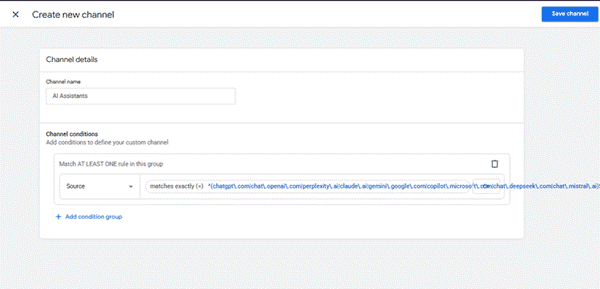
- Add a channel called AI Assistants.
- Create a condition using Source and the matches regex operator.
- Enter your tested AI source-matching expression.
- Move the new channel above Referral in the channel order.
- Save the group and review it in Traffic acquisition.
A starting expression, to test against the source values your own property actually receives before you rely on it:
^(chatgpt\.com|chat\.openai\.com|perplexity\.ai|claude\.ai|gemini\.google\.com|copilot\.microsoft\.com|chat\.deepseek\.com|chat\.mistral\.ai)$
It matches exact hostnames rather than words such as "ai" or "gpt", which would pull unrelated visits into the report. Custom channel groups also apply to historical data, but they cannot recover visits that arrived with no source information at all (Google's guide to custom channel groups).
Step 3. Keep UTM-tagged links from breaking the channel
OpenAI documents that ChatGPT adds utm_source=chatgpt.com to the links it shows. That tag gives GA4 a source even when the browser sends no referrer, but it does not guarantee the visit enters the built-in AI Assistant channel, which depends on the ai-assistant medium. That is one more reason the custom rule in Step 2 matches on source.
Tag the external links you control, such as email campaigns, consistently, and keep the parameters through redirects. Adviora's own fix list includes adding UTM tags to its email campaigns. Never add campaign tags to links between pages on your own site, because GA4 will start a new session with the wrong source.
The 8–15 October 2026 tracking gap
From about 8 October 2026, many ChatGPT links stopped carrying the utm_source tag and opened without a referrer, so analytics tools filed those clicks as Direct. Adobe's Cedric Huesler compared roughly 500 pages where ChatGPT had been a meaningful source and found ChatGPT visits falling while Direct rose on many of the same pages. He reported that OpenAI confirmed a bug on 14 October and that a fix rolled out on 15 October (Search Engine Land; Webflow).
If your ChatGPT numbers dipped that week:
Compare 8–15 October with the week before, for ChatGPT and Direct sessions.
Check the landing pages that usually receive ChatGPT visits for a matching rise in Direct.
Add a GA4 annotation and a note in your report for the gap.
A dip in ChatGPT matched by a rise in Direct is worth noting, but it does not prove every missing visit moved there, so never report estimated visits as measured ChatGPT referrals.
Step 4. Connect AI visits to lead events
A visit is useful; an audit request or a booked meeting tells you more. In Traffic acquisition, add the Key events metric, choose the event you care about, and compare the AI Assistant row with Organic Search and Referral on sessions, engaged sessions and session key event rate. In Adviora's property the relevant events are Sign_Up, Audit_Report_Email_Verified and generate_lead; use the events your own property actually records.
Check what your key events measure before you call them leads. Adviora's AI Assistant row showed key events, but a wider audit of the same property found that about half of all key events were pricing-page views. A pricing view shows interest; it is not an enquiry. So those two key events are not reported as leads. GA4 cannot tell you whether a lead is qualified either; that needs your CRM or another qualification step.
What referral numbers cannot tell you
Referral sessions are a floor. Three things sit outside them.
Answers without clicks. When an assistant names your brand but the reader does not click, GA4 records nothing. In Adviora's October review, most AI answers about its category cited third-party listicles rather than linking to vendors, so a brand can be shaping decisions with no referral rows at all. Measuring that needs a separate check of what AI answers say about you, as covered in our guide to running an AI visibility audit.
Fetches are not sessions. Server and CDN logs may show requests from ChatGPT-User, Claude-User or Perplexity-User. Those are systems fetching your page, usually without running your analytics code, so they never become GA4 sessions. Report them separately and never add them to session totals.
Later visits under other channels. A buyer who finds you in Claude and searches for your name next week arrives as Organic Search or Direct. Add "How did you first hear about us?" to your lead forms, with "ChatGPT or another AI assistant" as an option, and ask the same question on sales calls. Self-reported answers are imperfect, but they are evidence GA4 cannot provide.
The AI referral report template
Use the same layout every month so changes are easy to spot. This is the ai search analytics view most teams need first:
| Channel | Source / medium | Sessions | Engaged sessions | Key events | Key event rate | Date range | vs previous 28 days |
| AI Assistant | chatgpt.com / ai-assistant | 3 | 2 | 2 | 17 Sep–14 Oct 2026 | ||
| AI Assistant or Referral | perplexity.ai / … | ||||||
| AI Assistant or Referral | claude.ai / … | ||||||
| AI Assistant | gemini.google.com / … | ||||||
| AI Assistant | copilot.microsoft.com / … |
Below the table, add four notes kept apart from the session totals: unexplained changes in Direct traffic, known tracking gaps or GA4 setup changes, self-reported AI discovery from forms and calls, and brand mentions or citations found in AI answers.
Third, measure real business outcomes
Review your key events. If pricing-page views, ordinary interactions and lead submissions are all treated as equivalent conversions, clean up the measurement approach before reporting AI-generated leads. Once those three areas are working, you can expand into custom channel reporting, AI visibility monitoring and self-reported attribution.